The agent tax
Agentic coding tools — Claude Code on the web, OpenAI’s Codex, Cursor’s Cloud Agents, Jules, GitHub Copilot’s cloud agent, long tool-using runs in any chat — brought a new kind of dead time. The agent works unattended for twenty minutes, then stops: it wants approval to use a tool, it asked which of two approaches you prefer, or it simply finished and is waiting. Notice in ten seconds and the run flows. Notice in ten minutes and you’ve paid the agent tax.
What each agent tells you by itself
| Agent | How it tells you | What the radar reads |
|---|---|---|
| Claude Code on the web | In a project: desktop notifications in the desktop app; a dot on Overview in a browser[3]. Phone push for Remote Control sessions[4] | Its tabs on claude.ai/code, permission cards included |
| Codex (chatgpt.com/codex) | Shows its answer and a diff when it finishes; no notification documented for cloud tasks[5] | A ChatGPT session in the Build workspace |
| Cursor Cloud Agents | A Slack message when it completes, if Slack is connected[6,7] | Its pages on cursor.com |
| Jules | Browser notifications when a task completes or needs your input[8] | Its pages on jules.google.com |
| GitHub Copilot cloud agent | Requests your review on the pull request, which GitHub notifies you about[9] | Not read — it works in GitHub, not a tab |
Useful, if all your agents live in one place. Most people’s don’t — and none of these channels tells you about the other agents, or about the chat tab next to them.
The states that actually need you
- Needs permission. The agent asks to run a command, use a connector or go beyond what you pre-approved. Every minute unanswered is a minute of autonomy wasted.
- Asked a question. A genuine fork — “option A or B?” — that no amount of waiting resolves.
- Finished with undone work. The reply reads as done but ends with “remaining steps…”. Technically finished, actually paused.
- Waiting on your side. Something only you can do — add a secret, click an external confirmation, test on your machine.
- Rate limits and logouts. The silent ones: the run stops and nothing on screen demands attention.
- asked a question
- error
- model unavailable
- needs permission
- undone work
- work on your side
- logged out
- rate limit
Prevent the block in the first place
- Ask for everything up front. Start each run with the brief below, so questions and secrets come in the first minute, not the twentieth.
- Pre-approve what you can. Claude Code cloud sessions run in Accept edits, Plan or — where your organization allows it — Auto mode, with no manual or bypass option.[2] Choose the most permissive one you’re comfortable with before you leave.
- Decide the forks in advance. “Prefer the simpler option” and “note assumptions at the end” remove most “A or B?” stops.
- Watch the limit, not just the tab. A usage window that runs out mid-run is a block you can see coming (below).
Before you start: list every command you'll need to run and everything you'll need from me (secrets, accounts, decisions). Ask for all of it now, in one message.
After that, don't stop to ask. When two approaches are both reasonable, pick the simpler one and note it.
When you're done, end with: what you did, what you assumed, and anything left undone — as three short lists.
Catch the rest
A stopped stream looks the same for “done”, “asked a question” and “blocked on a permission card”. AI Tab Switch reads the page state per provider — claude.ai/code’s permission cards included, and in the browser Cursor, Jules, Devin, Replit, Lovable, Bolt and v0 — sorts each session into those states, and gives the blocked ones their own notification.
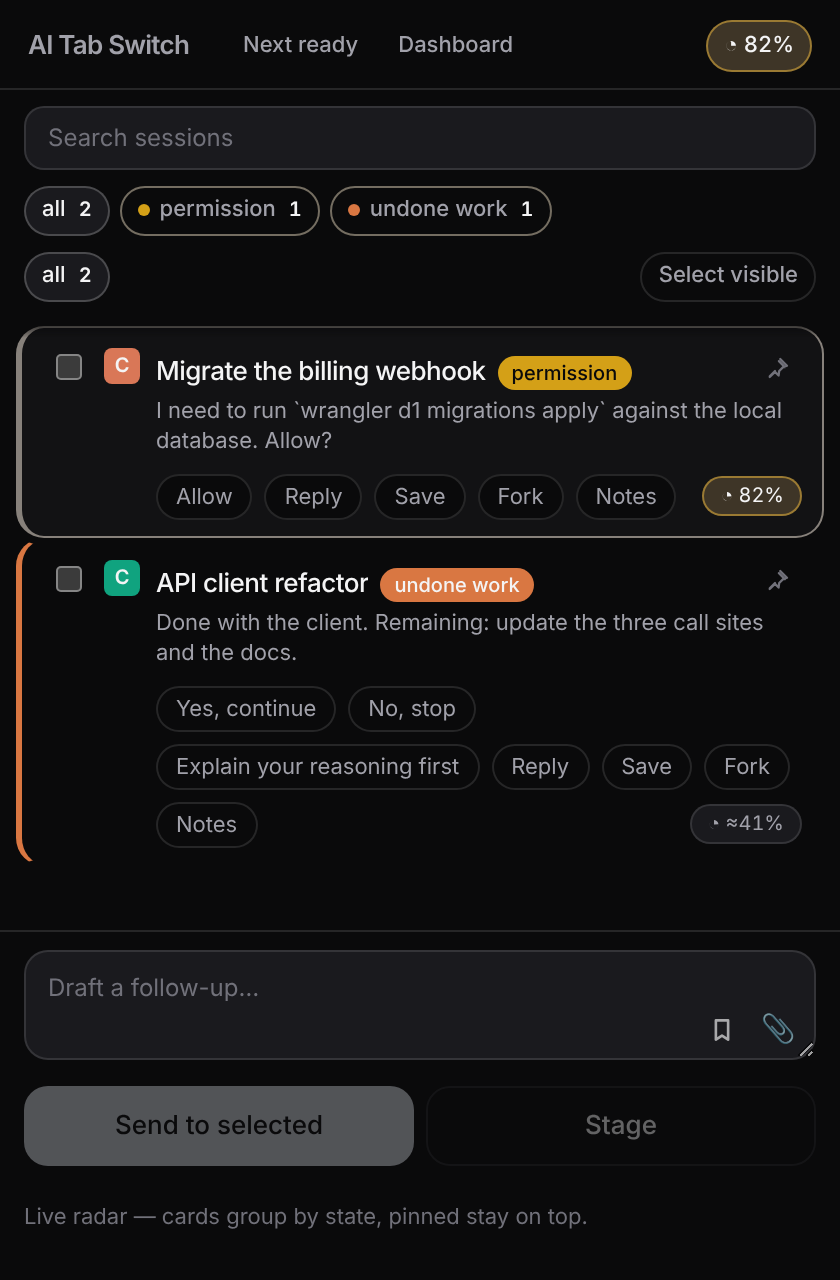
- Answer from the card. Allow, a quick reply or a typed answer, without switching tabs.
- Auto-continue. It clicks the Continue button a long Claude turn pauses behind. It ships on, and after 8 presses on one thread it hands the tab back to you.
- Usage warnings. Each card shows how close its provider is to its limit, with a warning at 80% and again at 95%.
- Reply triage, for replies that read finished but aren’t. An opt-in check sorts a finished reply into undone work, asked for approval or work on your side, on free models. Without a key of your own it runs on ours while you subscribe — the finished reply’s text goes to our server for that; with your own OpenRouter key it runs straight from your browser, within OpenRouter’s daily cap for free models.[10] It’s off by default and described in the privacy policy.
Your numbers
The cost of a block is the time it waits for you, times how often it happens. Put your own week in:
1.9 h of agent time a week, back.
Respond to blocked states in seconds and long agent runs start to feel like delegation instead of babysitting. See what setting it up takes, step by step.